
Roine Bertelson is a Stockholm-based tech writer, translator, and digital strategist with more than twenty years of hands-on experience in AI tools, Linux, consumer tech, cybersecurity, and SEO-driven content. He’s known for turning complex topics into clear and practical guidance that helps readers solve real problems. People trust his work because he actually uses and tests the tools he writes about, breaks things on purpose, and translates the chaos of modern technology into advice that feels human, honest, and useful.
I used to treat Gemini like a place I had to go to, which sounds harmless until you realize how often that “place” interrupts whatever you were doing. You know the routine. Open a new tab, navigate, type the prompt, wait a second, copy the answer, then jump back and try to pick up the thread you were holding. It works, technically, and for a while, I convinced myself that it was good enough.
But it always felt slightly disconnected, like I kept stepping out of my own workflow to borrow a brain for a moment before returning to what I was doing. Not slow enough to be frustrating, not broken enough to fix immediately, just … off in a way that quietly drains momentum over time. And once you notice that kind of friction, it’s very hard to ignore.
Why using Gemini in a tab never felt right
It turns a tool into a destination

Tabs are great for things you consume, whether that’s articles, videos, or documentation you open with the best of intentions and somehow turn into a 40-minute detour. Gemini isn’t that kind of tool. It lives in the middle of your thinking, not at its edge, and the moment you isolate it in its own tab, it starts behaving like a destination rather than something integrated into your process. That shift might seem small, but it comes with a cost, because every time you move to that tab, your brain has to reset just enough to break the rhythm you were in.
Individually, those micro-interruptions barely register. Stack them across a full day, though, and your workflow starts to feel fragmented in a way that’s difficult to explain but very easy to feel. I had normalized that pattern without realizing it, which is probably why it took me so long to question it.
The moment it clicked
I didn’t need another tab, I needed proximity

The fix didn’t come from discovering some new tool or building a complex setup that required a weekend and a pot of strong coffee to understand, but from realizing that I had been solving the wrong problem entirely. There was no new ecosystem to learn, no complicated setup to wrestle with, and definitely no “watch this 18-minute tutorial to optimize your life” situation lurking in the background. What I actually needed was far simpler. I didn’t need Gemini to be better. I needed it to be closer.
Close enough that I could reach it without thinking, without stepping away from what I was doing, and without that subtle mental context switch that breaks focus just enough to matter. Once that idea clicked, it became obvious that the issue wasn’t Gemini itself, but the way I kept treating it like a website instead of what it really is, which is an extension of the work happening right in front of me. That’s where Vivaldi quietly changes the game without making a big deal about it.
The better way to run Gemini
Keep it in Vivaldi’s web panel
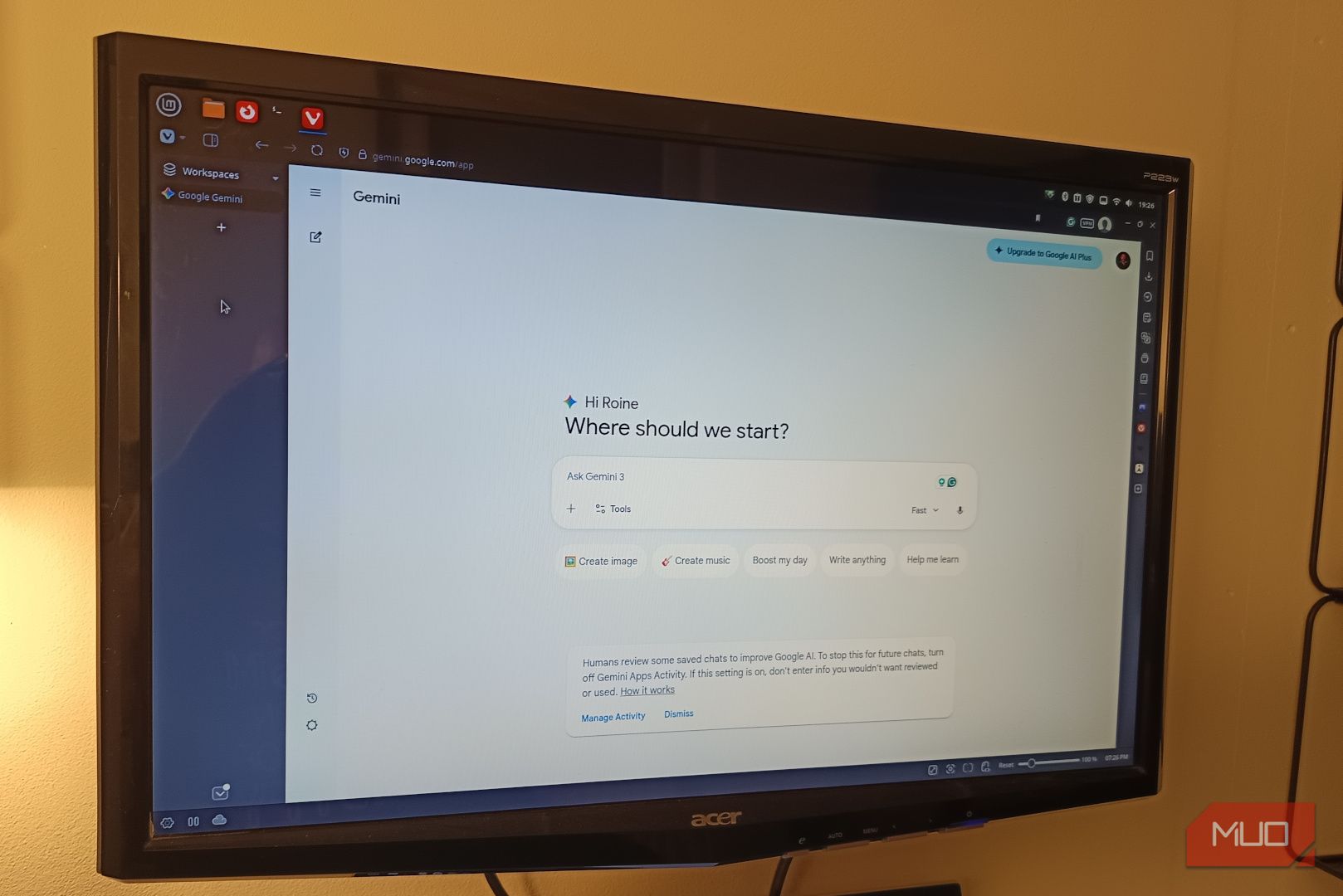
Vivaldi has a feature that sounds almost too simple to be useful, which is probably why so many people ignore it, but web panels turn out to be exactly what this kind of workflow needs. Instead of opening Gemini in a separate tab, you pin it to the sidebar, where it becomes instantly accessible without ever pulling you away from your current page. It slides in when you need it, stays out of the way when you don’t, and never forces you into that constant tab-hopping loop that quietly breaks your flow.
Setting it up takes less time than it takes to read about it:
- Open Gemini in a normal tab.
- Right-click anywhere on the page.
- Choose “Add Page to Web Panel.”
Once that’s done, you can close the tab and forget it ever existed, because Gemini now lives in your sidebar, always available but never intrusive. On Linux, this approach feels especially clean, since there are no extra layers, no wrappers pretending to be full applications, and no “install this helper tool to make it work properly” nonsense getting in the way. It’s just your browser doing something surprisingly elegant with a feature that has been sitting there the whole time. And the moment you start using it this way, the mental shift happens almost immediately, because you’re no longer opening Gemini, you’re simply using it.
What changed in daily use
Fewer steps, more flow

What surprised me wasn’t that this made things faster, although it absolutely did, but how much more natural everything felt once the friction disappeared. Instead of bouncing between tabs and constantly resetting my focus, I stay where I am, whether I’m writing, researching, or trying to figure out why something refuses to behave the way it should. Gemini slides in when I need it, gives me what I asked for, and disappears again without pulling me out of the moment. The copy-paste loop tightens up, the back-and-forth becomes smoother, and the whole interaction starts to feel less like a process and more like something that runs alongside your work rather than interrupting it.

Google Gemini
- OS
-
Android
- Developer
-
Google
- Price model
-
Subscription
Google Gemini is an AI assistant that can understand and generate text, images, code, and more. It’s designed to help people find information, solve problems, and create things more easily
What really caught me off guard, though, was that I started using it more, not because I suddenly depended on it more heavily, but because the barrier to using it dropped so low that it stopped feeling like a decision. It became something I reach for naturally, the same way you instinctively open a new tab or search for something without thinking twice. When a tool stops interrupting you, you stop resisting it.
AI works best when it disappears
There’s a strange paradox with tools like Gemini, where making them more visible often makes them feel more separate from what you’re doing, which in turn makes you less likely to use them unless you deliberately decide to. Keeping Gemini in its own tab made it feel optional, slightly distant, and easy to ignore, like something I would “go use” rather than something that was already part of my workflow.
Moving it into the sidebar changed that completely, because it stopped being a place I had to visit and became something that simply exists in the background, ready when I need it and invisible when I don’t.

Gemini isn’t as useless as it was when you tried it two years ago
AI that I first despised is now my Google Assistant replacement.
And once you get used to that level of integration, going back to opening a dedicated Gemini tab feels oddly outdated, like launching a separate app just to copy a single line of text. The tool didn’t change. The distance did.
About The Author